
Network cable looks like the simplest product in a cable catalog — and it is the one that generates the most after-sales arguments. A buyer compares quotes, sees "CAT6" printed on every jacket, picks the cheapest one, and only discovers the difference when a customer tries to push 10 Gbps down a 90-metre run, or when a PoE camera array starts dropping links in a warm ceiling void.
This guide walks through what actually separates CAT5e, CAT6 and CAT6A: the bandwidth each category is specified for, the distance limits that come with specific Ethernet applications, how shielding and conductor material change the outcome, and what to write on a purchase order so the goods you receive match the goods you quoted. It is written for importers, distributors and project buyers sourcing from factories rather than from retail shelves.
1. The one-screen answer: which category should you stock?
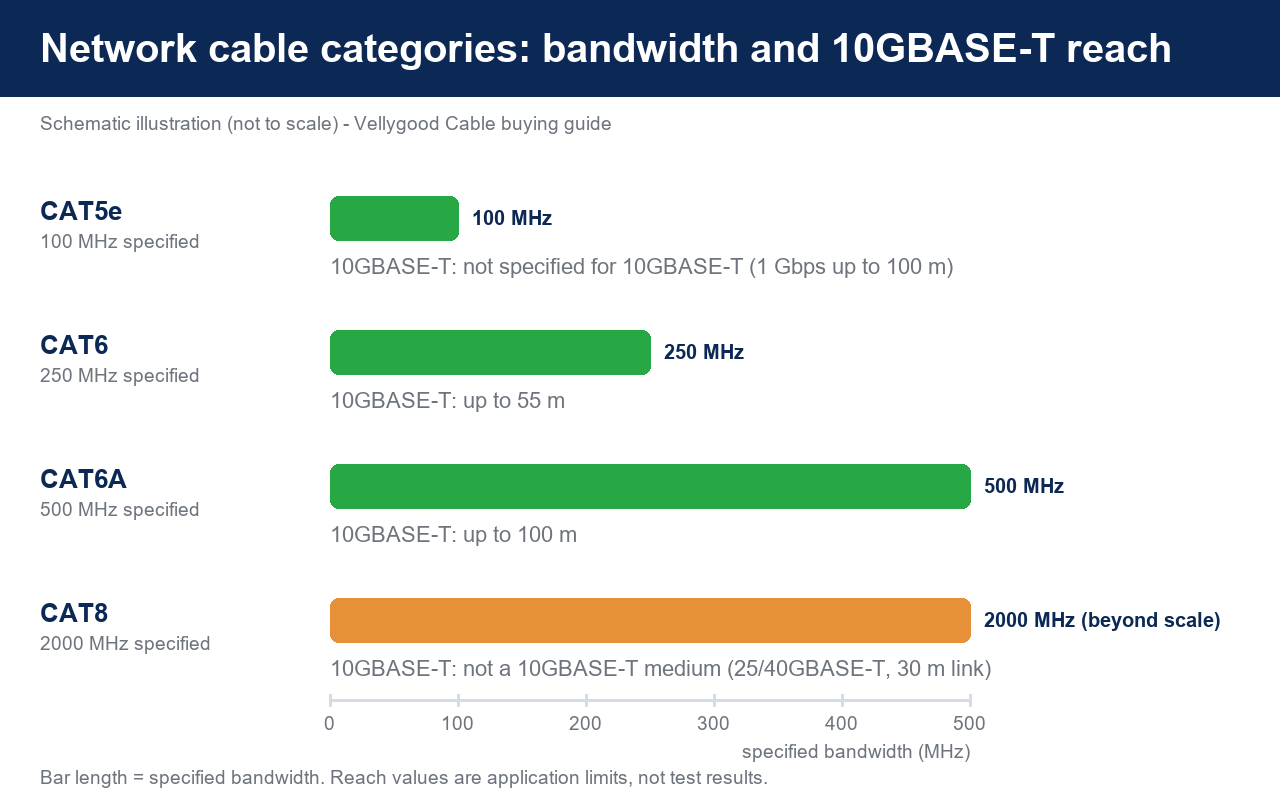
The table below is the short version. Everything after it explains where the numbers come from and where they get misinterpreted.
| Category | Specified bandwidth | Typical application | 10GBASE-T reach |
|---|---|---|---|
| CAT5e (Class D) | 100 MHz | 1 Gbps to the desk, VoIP, IP cameras | Not specified |
| CAT6 (Class E) | 250 MHz | 1 Gbps, 2.5G and 5GBASE-T, Wi-Fi 6 access points | Up to about 55 m |
| CAT6A (Class EA) | 500 MHz | 10GBASE-T backbones, PoE++ devices, data centres | Up to 100 m |
| CAT8 | 2000 MHz | 25/40GBASE-T switch-to-switch links, 30 m max | Not a 10GBASE-T medium |
Bandwidth figures above follow the widely published category definitions: 100 MHz for CAT5e, 250 MHz for CAT6 and 500 MHz for CAT6A, with CAT6A additionally carrying an improved alien crosstalk specification. In the ISO/IEC world the equivalent channel classes are Class D, Class E (250 MHz) and Class EA (500 MHz). US buyers will see the same products described by the TIA category system instead.
2. How to read a network cable datasheet without getting fooled
Three different numbers get mixed up in nearly every lost quotation: bandwidth in MHz, data rate in Gbps, and length in metres. They are not interchangeable, and a supplier that blurrs them is usually hiding something.
Bandwidth (MHz) is not speed (Gbps)
MHz describes the frequency range over which the cable meets its electrical limits. Gbps is what an active Ethernet standard can carry once it fits inside those limits. A CAT5e cable is tested to 100 MHz and is perfectly happy carrying 1 Gbps for 100 m; a CAT6A cable is tested to 500 MHz, which is what allows 10GBASE-T to fit inside a full-length channel.
The three electrical parameters that decide pass or fail
- Insertion loss — how much signal the cable eats over distance. It rises with frequency and length, which is why category and length limits are always quoted together.
- Near-end crosstalk (NEXT / PS-NEXT) — signal leaking between pairs at the connector end. This is where cheap connectors and untwisted conductor ends quietly destroy a CAT6 rating.
- Alien crosstalk (AXT) — noise coupling between neighbouring cables in the same bundle or tray. It is the reason CAT6 cannot hold 10GBASE-T at full distance: CAT6 was never specified to control it, while CAT6A was.
At the application layer, 10GBASE-T sets a channel budget that is tight by design — published IEEE 802.3an summaries put the channel insertion loss limit at roughly 20.9 dB and NEXT at 33.1 dB at 500 MHz. A cable "rated CAT6A" on a marketing page but tested only to 250 MHz will not deliver that budget, no matter what the jacket says.
The 100 m rule has two halves
The familiar 100 m limit is not a single cable measurement. TIA divides it into a permanent link of up to 90 m of installed horizontal cable plus up to 10 m of patch cordage in total — the assembly is called the channel, and it is the channel that carries the traffic. When a customer reports "it works at 80 m but fails at 95 m", the usual cause is a channel that is electrically longer than the installer believed: extra service loops, an over-long patch cord at the panel, or a consolidation point that was never counted.
3. CAT5e: still the volume workhorse
What it is: unshielded twisted pair tested to 100 MHz, typically 24 AWG, with the four pairs twisted at modest lay lengths and no internal separator.
Real use cases: office desks running plain 1 Gbps, VoIP handsets, low-power IP cameras, access control, hotel room drops — anywhere the link never needs to go beyond gigabit and the run stays inside 100 m.
How it differs: compared with CAT6 it is thinner, easier to bend, cheaper to terminate and more forgiving of rough handling. Its weakness is not speed at 1 Gbps but headroom: in a bundle of forty cables under a warm ceiling, a CAT5e link running 802.3at delivers noticeably less margin than CAT6.
Procurement note: CAT5e is the category where CCA conductor substitution is most common, because the price gap is most visible. If the purchase order does not state the conductor metal, expect aluminium.
4. CAT6: the default for new installation work
What it is: twisted pair tested to 250 MHz, usually 23 AWG, with a tighter twist and often a plastic cross-web separating the pairs to hold crosstalk down.
Real use cases: 1 Gbps and 2.5G/5GBASE-T links, Wi-Fi 6 and 6E access points, CCTV backbones, structured cabling where the installer wants 10G capability on shorter runs without paying for CAT6A.
The catch: CAT6 supports 10GBASE-T only for roughly 55 m. That figure assumes a low alien crosstalk environment; in a dense, tightly bundled installation the practical reach drops further. Buyers who quote "CAT6 for 10G" as a blanket claim are building a complaint into the order.
Procurement note: ask for the conductor metal and the AWG in writing. The CAT6 specification requires pure copper conductors — copper-clad aluminium does not meet it, regardless of what is printed on the sheath.
5. CAT6A: the 10G and PoE++ choice
What it is: twisted pair tested to 500 MHz with an alien crosstalk specification that CAT6 does not have, normally 23 AWG, often larger in diameter and often offered in shielded constructions.
Real use cases: 10GBASE-T at the full 100 m channel, multi-gigabit wireless access points, PoE++ (IEEE 802.3bt) devices such as pan-tilt-zoom cameras, digital signage and LED lighting controllers, and any backbone expected to stay in service for a decade.
How it differs: the extra performance comes from construction, not from a label. CAT6A typically uses more copper, tighter pair geometry and, in shielded versions, a foil or braided screen. That makes it heavier, stiffer and more expensive — and it also means installation quality matters more, not less.
Procurement note: CAT6A claims are the easiest to fake and the easiest to test. Require the factory to state the tested frequency (500 MHz), the conductor metal and AWG, and to supply test data on the finished assembly.
6. Shielded or unshielded? U/UTP, F/UTP and S/FTP
Shielding codes describe what is wrapped around what. Reading them correctly saves buyers from paying for screens they cannot ground.
| Code | Construction | Best for | Trade-off |
|---|---|---|---|
| U/UTP | No overall screen, no pair screen | Offices, homes, general 1G/2.5G work | Cheapest and easiest to terminate |
| F/UTP | Overall foil screen plus drain wire | Factories, plants, routes near drives and power | Screen only works if bonded to ground at both ends |
| S/FTP | Foil around each pair plus overall braid | 10G backbones, data centres, high-EMI routes | Stiffest, largest diameter, highest cost |
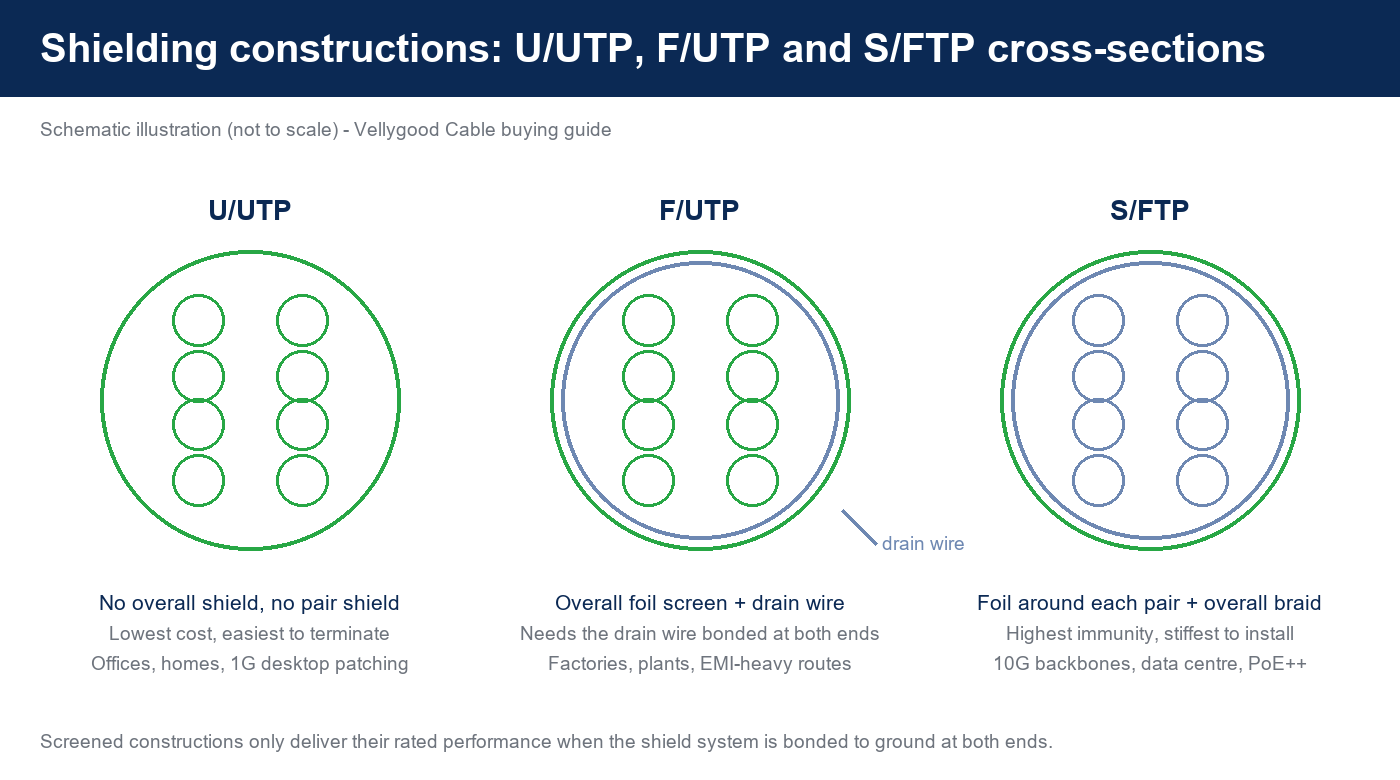
Two rules matter more than the code itself. First, a screened system must be a system: shielded cable, shielded jacks and a grounded patch panel, all bonded. Second, bonding happens at both ends — a screen connected at one end only behaves like an antenna and can measure worse than unshielded cable. If the site cannot guarantee that discipline, unshielded CAT6 or CAT6A is the more reliable purchase.
7. Conductor traps: pure copper, CCA and CCS
Conductor metal is the single largest cost variable in a network cable, which makes it the single largest opportunity for substitution. "Copper" is not a specification.
| Conductor | What it is | DC resistance | Where it is acceptable |
|---|---|---|---|
| Solid or stranded bare copper | Copper all the way through | Lowest of the three | All category-rated and PoE applications |
| CCA (copper-clad aluminium) | Aluminium core with a thin copper skin | Typically around 55% higher than equivalent-gauge copper | Short 1 Gbps patch runs where PoE and category certification are not required |
| CCS (copper-clad steel) | Steel core with a copper skin | Higher still; stronger and more fatigue-resistant | Signal-only cables where tensile strength matters |
The resistance figures above are widely published industry estimates rather than a clause in the cable standard, so treat them as engineering guidance. What is in the standard is unambiguous: the CAT6 specification requires pure copper conductors, and non-compliant CCA cable sold as CAT6 has exposed both manufacturers and installers to legal liability in the US market.

8. Naming and perception traps
Network cable has an unusually rich supply of labels that sound like specifications but are not. Four of them cause most of the confusion.
- "CAT6e". There is no such standard. CAT6e has no agreed definition; it is normally a marketing claim of headroom above CAT6, and the name deliberately echoes the legitimate CAT5e. If a factory quote offers CAT6e, ask for the tested frequency and the standard it is tested against.
- "CAT7" in a CAT6 job. Category 7 is recognised by ISO/IEC as Class F, but it is not a TIA/EIA category and its connectors are not the 8P8C interface most installers expect. Selling CAT7 for a 10GBASE-T project solves nothing that CAT6A does not solve.
- "10G ready" printed on the sheath. Jacket print is decoration, not certification. What counts is the tested frequency, the conductor metal, the AWG and whether the finished assembly was tested as a channel or permanent link.
- Alien crosstalk denial. Suppliers quote "CAT6 = 10G" knowing that the 100 m figure belongs to CAT6A and the 55 m figure to CAT6 in a favourable environment. Ask the question directly: "what is the 10GBASE-T reach you are warranting, in a bundled installation?"
9. Solid or stranded conductors? Patch cord versus permanent link
Solid conductors are used for the installed horizontal cable between the patch panel and the wall outlet, where the cable is terminated once and never moved. Stranded conductors are used for patch cords, where flexibility and repeated bending matter more than the last fraction of a decibel of attenuation. A stranded conductor is more flexible but has slightly higher attenuation at high frequency; a solid conductor performs better but work-hardens and can crack if it is flexed repeatedly. Practical consequence: never substitute a patch cord for a permanent link, and never use solid horizontal cable as a moving patch cord.
10. Jacket and fire ratings: what the destination market requires
Jacket material is a compliance decision before it is a technical one, because the requirements differ by region.
| Marking | Market | Meaning |
|---|---|---|
| CM / CMX | North America | General-purpose and limited-use communications cable |
| CMR | North America | Riser-rated for vertical shafts between floors |
| CMP | North America | Plenum-rated for air-handling spaces; the most demanding rating of the three |
| LSZH / LSOH | Europe, Middle East, Asia | Low-smoke, zero-halogen jacket; required where smoke and toxic gas are a design concern |
| CPR class (Aca–Fca) | European Union | Reaction-to-fire classification under the Construction Products Regulation and its harmonised cable standard EN 50575 |
In North America the applicable marking requirements sit in the National Electrical Code; in the EU, cables permanently installed in buildings fall under the CPR and carry a declared reaction-to-fire class, with Dca and Cca being the common levels for LAN cable. If you are importing into the EU, that declared class is a document you should be able to obtain from the factory — not an assumption.
11. What to put on the purchase order: a sourcing checklist
Copy this list into your next RFQ. Every line removes one argument that would otherwise happen after delivery.
- Category and tested frequency (for example CAT6 tested to 250 MHz, or CAT6A tested to 500 MHz).
- Shield code in full — U/UTP, F/UTP or S/FTP — plus whether the drain wire is present.
- Conductor metal, spelled out as "bare copper" or "CCA". Never accept "copper" alone.
- AWG and construction: solid or stranded, and the strand count if stranded.
- Jacket material and fire/CPR marking required by the destination market.
- Jacket colour and print text, including the printed length increment.
- Length range and tolerance for patch cords, and whether length includes the connectors.
- Connector type (8P8C), plating thickness, moulded or assembled, and the strain-relief style.
- Wiring scheme T568A or T568B, applied to both ends.
- Test evidence: wiremap, length, propagation delay, insertion loss, NEXT and return loss — permanent-link or channel, and the tester model.
- Sample and packaging details: retail bag, header card, barcode or bulk carton.
- Compliance documentation: RoHS and REACH statements, EMC test report where applicable, and the CPR class if shipping to the EU.
12. Common mistakes and what they cost
- Quoting "CAT6 for 10G at 100 m". The link fails certification at anything past about 55 m, and the installer eats the rework and the replacement cable.
- Buying shielded cable without grounded hardware. The screen adds cost, stiffness and installation time while delivering no measurable benefit — and can add noise.
- Accepting CCA where the site expects pure copper. PoE runs generate more heat and drop more voltage, and category certification is not achievable. Returns arrive six months later, after the installation is closed.
- Forgetting patch cords in the channel budget. A 90 m permanent link plus two 5 m patch cords is over the 100 m channel limit before the first packet is sent.
- Never checking the wiring scheme. A cord wired T568A at one end and T568B at the other is a crossover cable; it will fail intermittently on some equipment and look like a network fault rather than a cable fault.
13. Quality control and acceptance before you ship
Factory-side testing is cheaper than a customer claim. For network cable, the working set is: 100% continuity and wiremap on every patch cord; length and propagation delay verification; insertion loss, NEXT and return loss on sampled or full production depending on the agreed AQL; visual inspection of moulding, strain relief and jacket print; and bundle-level heat considerations for any PoE++ order. Our own lines are continuity and aged tested before shipment, and our HDMI, USB, network and audio cables carry CE/EMC (EN 55032) and RoHS documentation — ask for the current report set for the exact model you are buying, since certification is per construction and connector.
On site, the acceptance test should mirror the order: certify the permanent link to the category you paid for, record wiremap and length, and store the results. If a project's only test is "the laptop gets an IP address", the cable has not been tested at all.
14. Choosing a supplier you can grow with
Categories, screens and conductor metals are engineering choices; the supplier relationship is the commercial one. The practical questions are whether the factory can hold a conductor specification across repeat orders, whether it can quote both a CCA and a copper version of the same construction so you can sell at two price points, and whether it can move between CAT5e, CAT6 and CAT6A on the same connector platform without changing the look of your retail line. Browse the full Vellygood product range — network patch cords sit alongside HDMI, USB, power, audio, VGA and adapter lines that share the same QC process — or compare the power side of the installation with our EU plug-to-C13 desktop power cord and 12 V 6 A power adapter in the related products below.
15. Conclusion: match the category to the job, then specify it in writing
CAT5e still wins on cost for straightforward gigabit drops. CAT6 is the sensible default for new installation work, with 10GBASE-T reach of about 55 m and better PoE headroom than CAT5e. CAT6A is the only category that carries 10GBASE-T over a full 100 m channel, and it is the right choice wherever PoE++ or a multi-gigabit backbone is planned.
Around those three choices sit the decisions that actually determine the outcome: shield code and grounding discipline, conductor metal stated in writing, AWG and strand construction, jacket and fire rating for the destination market, wiring scheme, and test evidence. Get those right on the purchase order and the cable you receive will match the cable you sold.
Related network and cabling products from Vellygood
- UTP CAT.6 Patch Cord — 6 × 0.12 mm stranded conductors, 5.9 mm PVC jacket, light grey, moulded 8P8C connectors
- Full product catalog — HDMI, USB, network, power, audio and VGA cable lines
- EU Plug to C13 Desktop Power Cord — 3 × 0.3 mm², 1.5 m, EU plug test report on file
- 12 V 6 A Desktop Power Adapter — 110–250 V input, LVD and EMC certified, customisable plug and output

